
Wat is PEPPOL?
Vanaf 1 januari 2026 mag je geen PDF-facturen meer mailen naar bedrijven. De overheid verplicht elektronische facturatie via Peppol - een beveiligd Europees netwerk voor facturen.
Denk aan een digitale brievenbus: je ondernemingsnummer is het adres, facturen komen daar automatisch toe. Net zoals de postbode weet waar jouw fysieke brievenbus staat, weet Peppol waar jouw digitale brievenbus staat.
Het grote voordeel? Het scheelt veel tijd, voorkomt fouten door handmatige invoer en versnelt de betaling, omdat alles automatisch verwerkt kan worden. Bovendien ben je vanaf 2026 gewoon wettelijk in orde.
Hoe werkt het?
Je hebt een "digitale brievenbus" nodig om facturen te kunnen versturen én ontvangen. Die brievenbus maak je aan via een softwareprovider zoals Pixi.
Belangrijk: de software voor verzenden en ontvangen hoeft niet dezelfde te zijn. Je kan facturen ontvangen in je boekhoudpakket, maar verzenden via Pixi.
Wat kan Pixi voor mij?
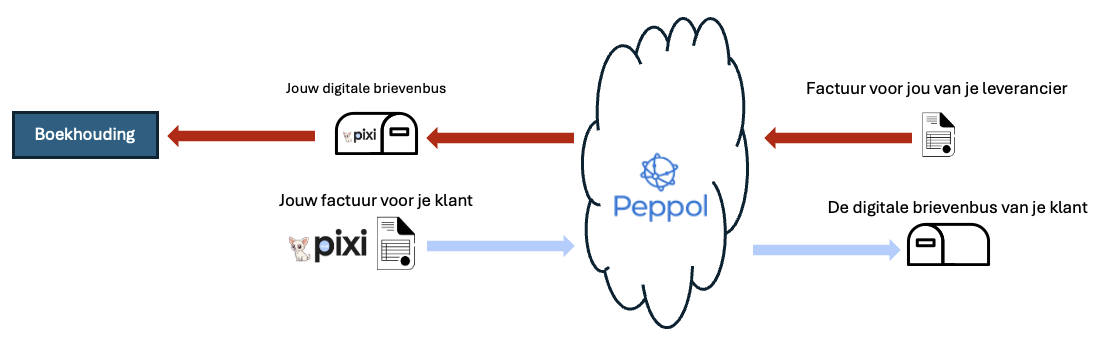
Optie 1: Alles via Pixi
- Pixi maakt je digitale brievenbus aan
- Je ontvangt facturen van leveranciers via Pixi
- Je verstuurt facturen naar klanten via Pixi
- Optioneel: maak facturen in Pixi of upload ze uit je eigen systeem
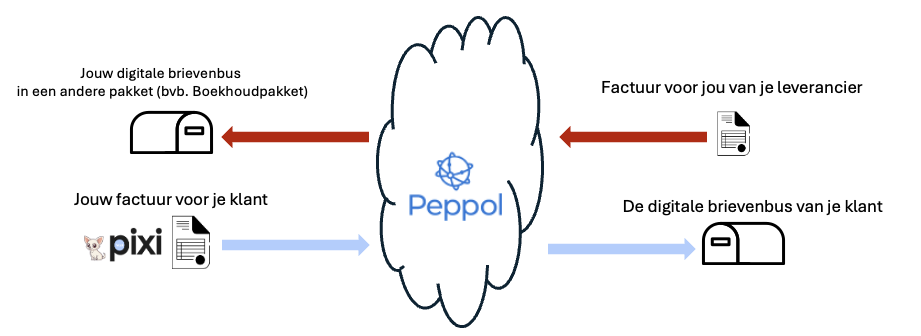
Optie 2: Alleen verzenden via Pixi
- Je brievenbus staat bij je boekhouder/boekhoudpakket
- Je ontvangt facturen daar
- Je verstuurt facturen via Pixi
- Optioneel: maak facturen in Pixi of upload ze uit je eigen systeem
Qu'est-ce que PEPPOL ?
À partir du 1er janvier 2026, vous ne pourrez plus envoyer de factures PDF par e-mail aux entreprises. Le gouvernement impose la facturation électronique via Peppol - un réseau européen sécurisé pour les factures.
Pensez à une boîte aux lettres numérique : votre numéro d'entreprise est l'adresse, les factures y arrivent automatiquement. Tout comme le facteur sait où se trouve votre boîte aux lettres physique, Peppol sait où se trouve votre boîte aux lettres numérique.
Le grand avantage ? Cela fait gagner beaucoup de temps, évite les erreurs dues à la saisie manuelle et accélère le paiement, car tout peut être traité automatiquement. De plus, vous serez simplement en règle légalement à partir de 2026.
Comment ça marche ?
Vous avez besoin d'une "boîte aux lettres numérique" pour pouvoir envoyer et recevoir des factures. Vous créez cette boîte aux lettres via un fournisseur de logiciels comme Pixi.
Important : le logiciel d'envoi et de réception ne doit pas être le même. Vous pouvez recevoir des factures dans votre logiciel comptable, mais les envoyer via Pixi.
Que peut faire Pixi pour moi ?
Option 1 : Tout via Pixi
- Pixi crée votre boîte aux lettres numérique
- Vous recevez les factures des fournisseurs via Pixi
- Vous envoyez les factures aux clients via Pixi
- Optionnel : créez des factures dans Pixi ou téléchargez-les depuis votre propre système
Option 2 : Envoi uniquement via Pixi
- Votre boîte aux lettres est chez votre comptable/logiciel comptable
- Vous y recevez les factures
- Vous envoyez les factures via Pixi
- Optionnel : créez des factures dans Pixi ou téléchargez-les depuis votre propre système
What is PEPPOL?
From January 1, 2026, you will no longer be able to email PDF invoices to businesses. The government mandates electronic invoicing via Peppol - a secure European network for invoices.
Think of it as a digital mailbox: your business number is the address, invoices arrive there automatically. Just as the postman knows where your physical mailbox is, Peppol knows where your digital mailbox is.
The big advantage? It saves a lot of time, prevents errors from manual entry and speeds up payment, because everything can be processed automatically. Moreover, you will simply be legally compliant from 2026.
How does it work?
You need a "digital mailbox" to be able to send and receive invoices. You create this mailbox through a software provider like Pixi.
Important: the software for sending and receiving does not have to be the same. You can receive invoices in your accounting package, but send them via Pixi.
What can Pixi do for me?
Option 1: Everything via Pixi
- Pixi creates your digital mailbox
- You receive invoices from suppliers via Pixi
- You send invoices to customers via Pixi
- Optional: create invoices in Pixi or upload them from your own system
Option 2: Send only via Pixi
- Your mailbox is with your accountant/accounting package
- You receive invoices there
- You send invoices via Pixi
- Optional: create invoices in Pixi or upload them from your own system